

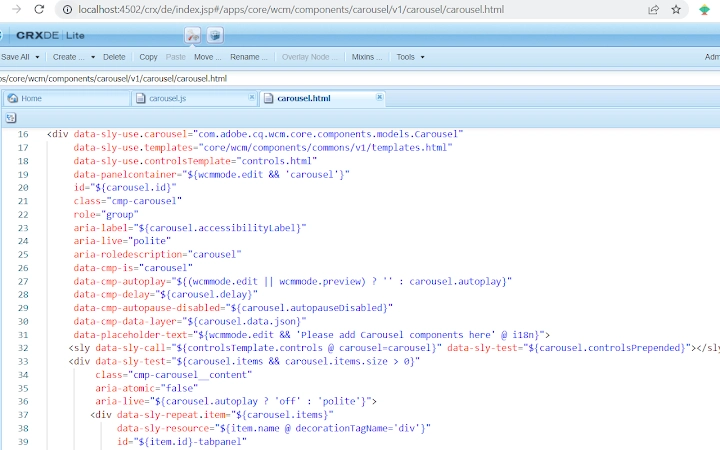
Description
Enhanced AEM CRX Editing with Smart Code Tools
Overview
The CRX Power Editor is a browser extension designed specifically for AEM developers seeking a more efficient and visually refined editing experience within the AEM CRX Editor environment. Its primary function is to enhance the default code editing interface found at /crx/de/index.jsp by integrating advanced code editing capabilities. This tool addresses common pain points associated with the native editor, such as limited syntax highlighting, lack of customization, and a minimalistic user interface. By upgrading the underlying CodeMirror IDE to more modern alternatives like Visual Studio Code or Code Mirror 6, the extension aims to streamline development workflows for content authors and developers working directly with AEM's repository.
Target users include AEM developers, technical content managers, and system administrators who frequently interact with AEM’s CRX repository. The extension is particularly useful in scenarios involving frequent file edits, template modifications, or configuration changes where a robust code editor can significantly improve productivity. It supports personalized color themes, allowing developers to work in preferred visual environments—dark or light modes—without altering system-wide settings. The tool is strictly limited to the /crx/de/index.jsp page, ensuring it does not interfere with other AEM components or workflows.
Key Features & Capabilities
- Smart Code Editor Integration: Dynamically replaces the default CodeMirror IDE with enhanced versions such as Visual Studio Code or Code Mirror 6, offering advanced syntax highlighting, auto-completion, and improved code navigation.
- Customizable Color Themes: Supports multiple visual themes including dark and light modes, enabling developers to personalize their editing environment for comfort and reduced eye strain during long coding sessions.
- Context-Aware Activation: The extension can be toggled on or off per site, allowing selective use based on project needs or environment requirements.
- Efficient File Loading: Improved handling of large files and slow network conditions, reducing the likelihood of blank file displays during delayed load times.
- Enhanced File Type Support: Fixed rendering issues for Markdown, Properties, and Handlebar files in the Visual Studio editor, ensuring consistent and accurate display across common AEM file formats.
These features are particularly beneficial during AEM development sprints, where rapid editing and accurate file visualization are critical. The ability to switch between themes and activate the editor selectively helps maintain consistency across teams and environments. The integration of modern code editing tools directly within the CRX interface eliminates the need to switch between multiple applications, improving workflow continuity.
User Interface, Workflow & Performance
The user interface of CRX Power Editor is minimal and focused, designed to integrate seamlessly into the existing AEM CRX Editor layout. It operates as a browser extension, meaning its interface is embedded within the browser tab where /crx/de/index.jsp is accessed. Navigation remains unchanged from the native CRX Editor, with the extension enhancing the code editing area without disrupting the file tree or metadata panels.
Workflow efficiency is improved through automatic code editor upgrades and theme persistence. Developers can begin editing immediately after enabling the extension, with no additional setup required. The use of Mutation Observer instead of setInterval for detecting new tabs helps avoid performance degradation and infinite loops, contributing to a more stable experience.
The developer did not specify resource usage details. Performance observations are based on general software behavior patterns. Stability is expected to be high given the focused scope and limited runtime environment. CPU and RAM behavior are not publicly documented, but the extension is designed to operate only on specific pages and does not run continuously in the background.
Compatibility & System Requirements
CRX Power Editor is compatible with Windows, Mac, and Linux operating systems, ensuring broad accessibility for AEM developers across different environments. It functions exclusively on the AEM CRX Editor interface at /crx/de/index.jsp, and is not intended for use with other web pages or AEM components.
The installation size is 2.3 MB, which is relatively lightweight for a browser extension with code editor enhancements. The software version is 1.1.0, released on May 20, 2024. Exact system requirements were not listed. Compatibility information was partially provided, with the extension relying on modern web standards and a compatible browser environment.
Pros and Cons
Pros
- Enhances the native AEM CRX Editor with modern code editing features
- Supports customizable dark and light themes for improved visual comfort
- Lightweight at 2.3 MB with no persistent background processes
- Context-aware activation allows per-site enable/disable control
- Improved handling of large and slow-loading files
Cons
- Restricted to the /crx/de/index.jsp page only; not usable elsewhere
- Does not support offline editing or file saving outside AEM
- Requires a compatible browser and AEM environment to function
- Advanced features are tied to specific AEM workflows, limiting general usability
FAQ Section
Is CRX Power Editor compatible with all AEM versions?
The extension is designed for use with AEM environments that support the /crx/de/index.jsp interface. Specific compatibility with AEM versions was not provided by the developer.
Can I use this extension offline?
The extension requires an active connection to an AEM instance to function. It cannot operate in offline mode or save files independently.
Does the extension affect other AEM pages or components?
No. The extension is limited to the /crx/de/index.jsp page and does not alter or interfere with other AEM interfaces or components.
Is the extension safe to use?
As a browser extension that operates only on a specific AEM page, it does not access system data or store user credentials. It is considered safe for use in development and staging environments.
How often are updates released?
Updates are issued based on feature improvements and bug fixes. The latest version, 1.1.0, was released on May 20, 2024, and includes performance enhancements and stability fixes.
Final Thoughts + CTA
CRX Power Editor delivers a focused and effective enhancement to the AEM CRX Editor experience, bringing modern code editing capabilities to a traditionally limited interface. Its ability to integrate advanced IDE features, customizable themes, and improved file handling makes it a valuable tool for AEM developers. While its functionality is restricted to a single page, this limitation ensures stability and security. The extension is particularly well-suited for teams that rely heavily on direct repository editing and value a more productive, visually comfortable workflow.
For developers working with AEM, this tool offers a meaningful upgrade without complexity. Its lightweight design and targeted purpose make it a reliable addition to any AEM development toolkit.
Download CRX Power Editor now
Guides & Tutorials for AEM CRX - Power Editor Extension for Chrome
How to install AEM CRX - Power Editor Extension for Chrome
- Click the Preview / Download button above.
- Once redirected, accept the terms and click Install.
- Wait for the AEM CRX - Power Editor Extension for Chrome download to finish on your device.
How to use AEM CRX - Power Editor Extension for Chrome
This software is primarily used for its core features described above. Open the app after installation to explore its capabilities.
User Reviews for AEM CRX - Power Editor Extension for Chrome 0
No reviews found





